Genuine Optimum
Product portfolio · 2026

Construction Expense & Finance Management System

Project-level expense, cash-flow and supplier accounting for construction firms. Every amount is entered once, and every view reads the same ledger.

Confidential
Project dashboard
The problem Approach The product
02

Site money is recorded twice and reconciled late

Most construction spending is still captured on paper: a site register, a diary, a bundle of vouchers, and a message thread. The numbers exist, but they sit in the wrong places, and nobody can prove which copy is right.

One copy only
The register is the record

A lost, burnt or rain-damaged book takes the project history with it. There is nothing to check it against.

Two totals
Site figure, office figure

The gap between them surfaces at month end, by which time the cash has already moved.

Balances
Party dues live in memory

What is owed to which supplier is rebuilt from a pile of receipts every time somebody asks.

No trail
Corrections leave no history

An amount can be changed, or a page removed, with no record of who did it or what the figure was before.

Each of these is a record-keeping problem before it is an accounting problem. That is where the product starts.

Genuine OptimumConstruction Expense & Finance Management System
The problem Approach The product
03

One ledger. Every view reads from it.

An expense is entered once, by whoever is standing in front of the supplier, against exactly one project. From that single record the project total, the category head, the party balance and the cash position all follow. There is no second book to keep in step.

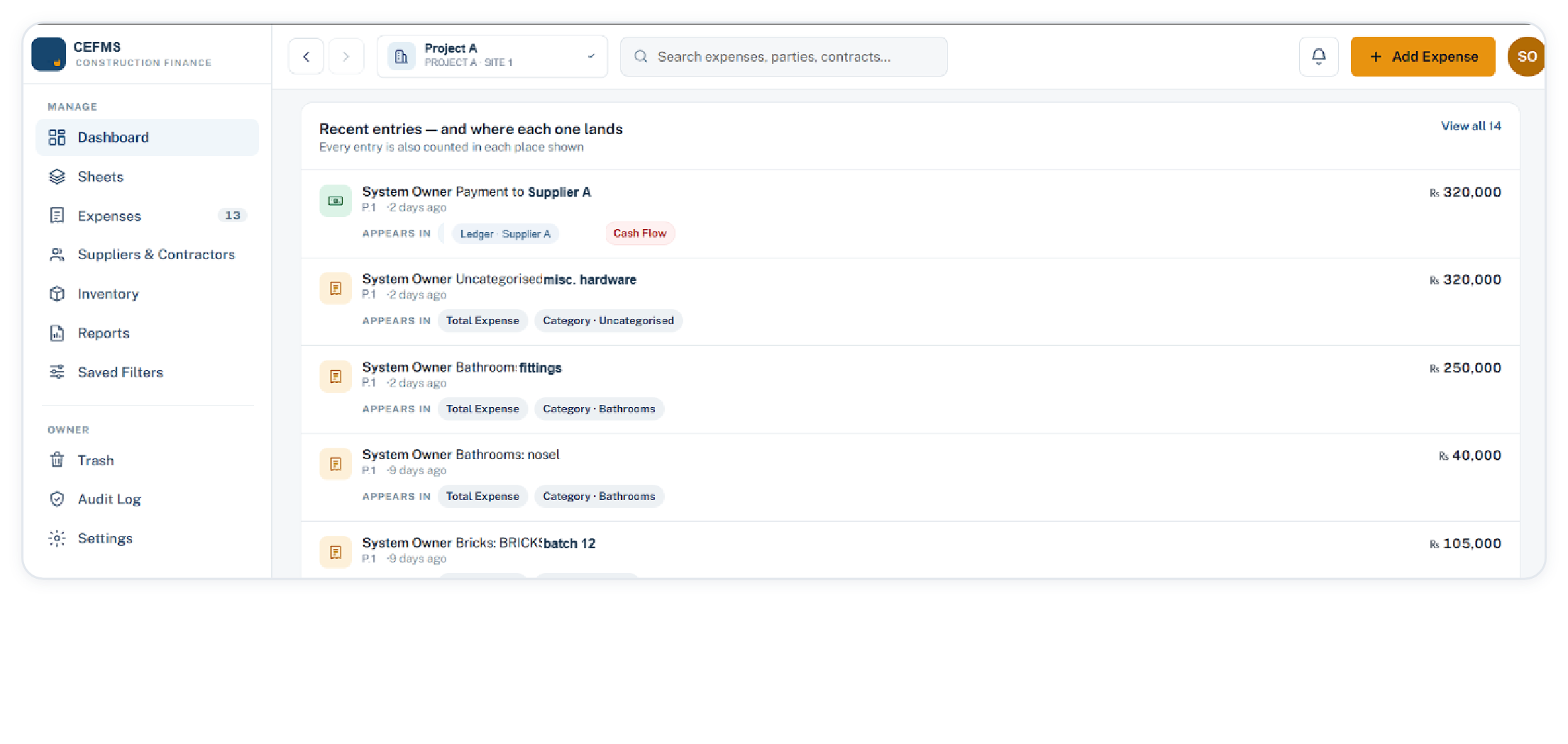
Recent entries feed
Recent entries · each row carries its project, its party and the user who entered it
One entry feeds Total expense Category head Party ledger Cash flow
Payments and expenses stay separate

An expense books a cost. What it leaves owed and what was actually paid post to the party as two separate ledger entries, so a part payment is never rounded into one figure.

Amounts are stored exactly

Money is never rounded. Every entry is written to the audit log with the user, the action and the time, and that log is kept in full.

Genuine OptimumConstruction Expense & Finance Management System
Dashboard Expenses Sheets Parties
04

The dashboard answers the first question first

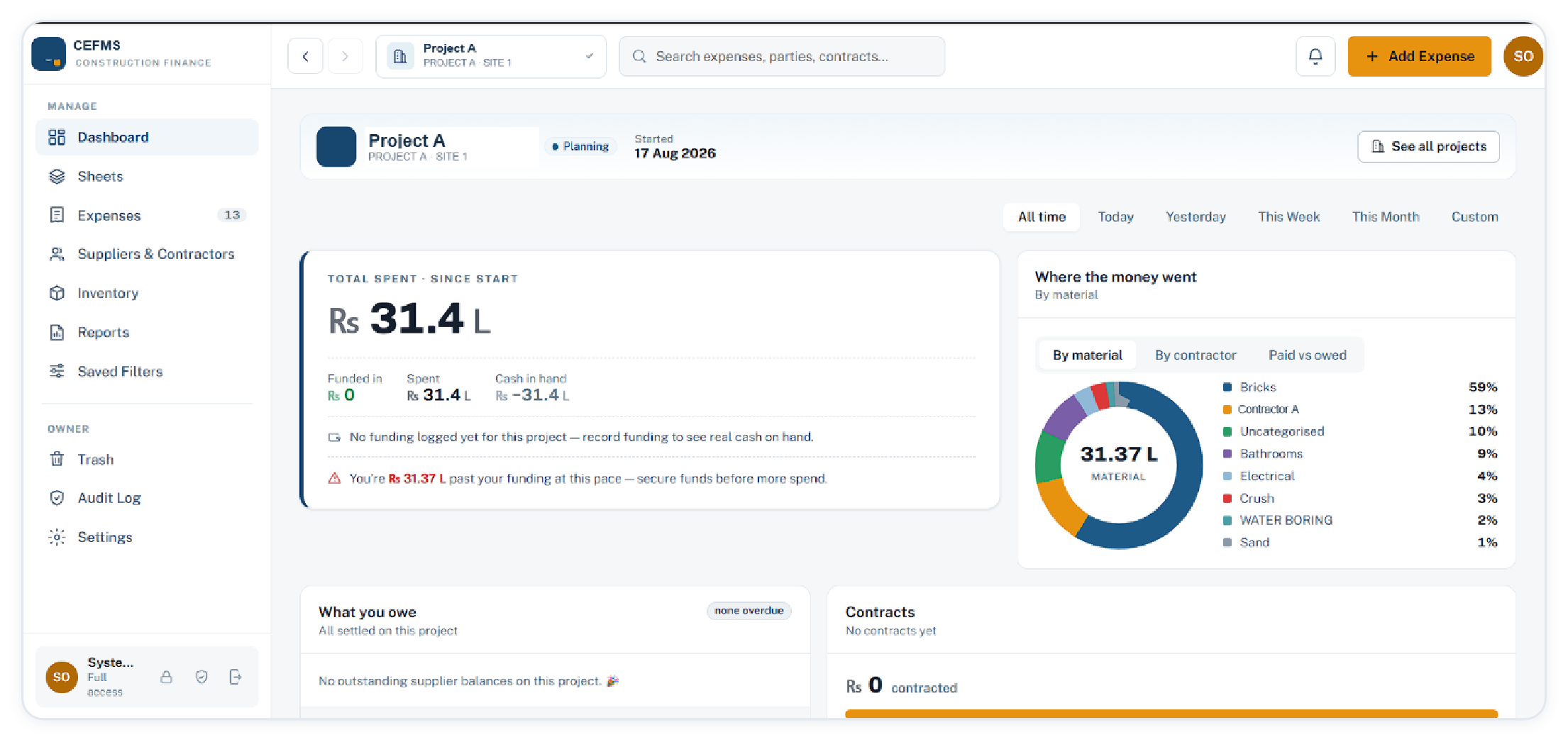
Total spent since the start, what came in against it, and what is left in hand. When spending has run ahead of recorded funding, the card says so in words and gives the figure.

Project dashboard with total spent, funding and spend by category
Dashboard · single project · all time, today, yesterday, this week, this month, custom
Cash in hand, not only spend

Funded in, spent and cash in hand sit under the headline figure, so a negative position is visible at a glance.

Where the money went

The same spend read three ways: by material, by contractor, and paid against owed.

Owed and contracted

Outstanding supplier balances and contract value for the project, with an overdue count beside them.

Genuine OptimumConstruction Expense & Finance Management System
Dashboard Expenses Sheets Parties
05

Progress, rate per square foot, stock on hand

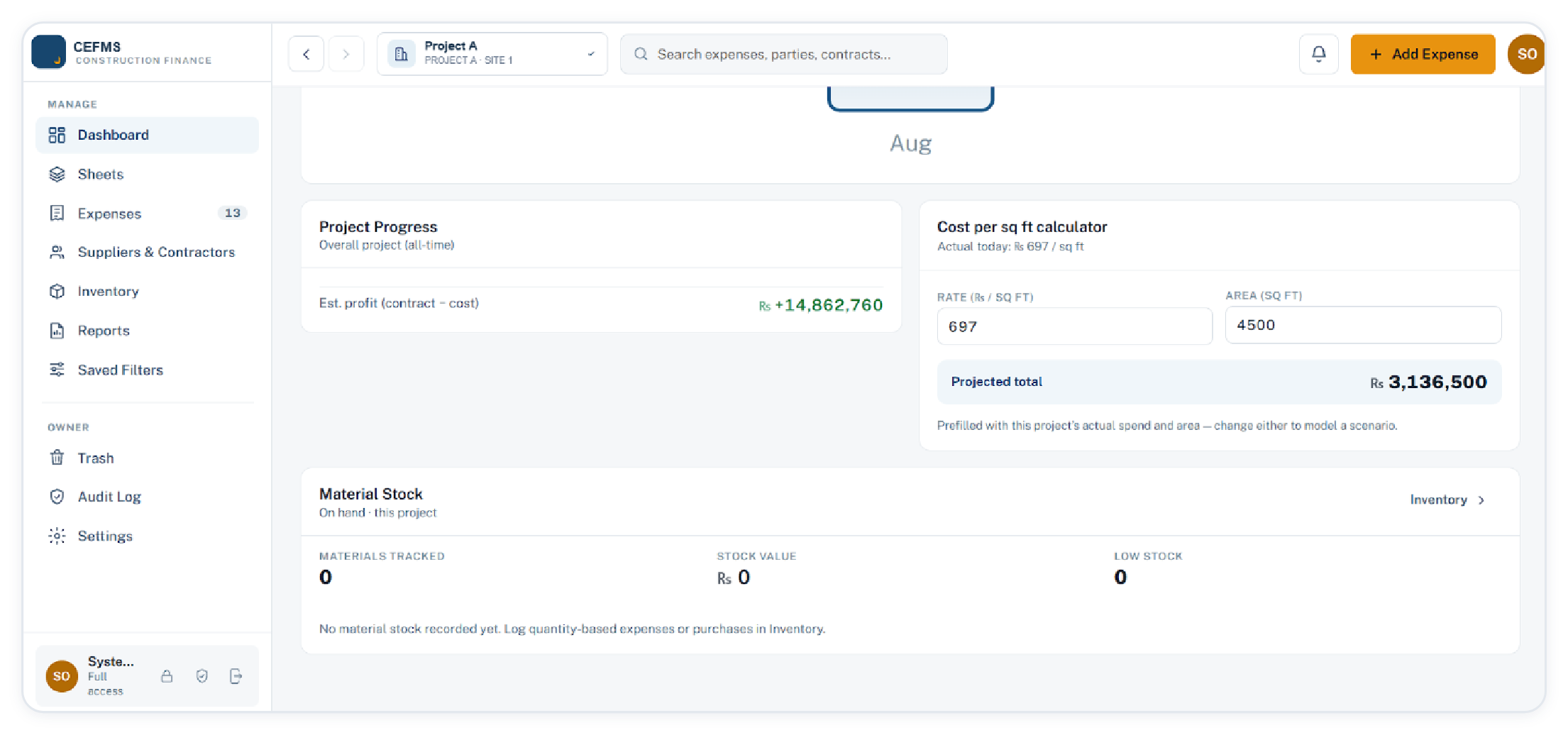
The lower half of the dashboard is for the estimating conversation: estimated profit against the contract value held on the project, and a cost per square foot calculator prefilled from its own spend and covered area, so a scenario can be modelled by changing one field.

Project progress, cost per square foot calculator and material stock
Dashboard · project progress, cost per sq ft calculator, material stock
Actual today

The rate shown comes from real spend divided by real area, not from a quotation.

Estimated profit

Contract value less cost booked to date, updated as entries arrive.

Stock on hand

Materials tracked, stock value and low stock count for this project, read from the inventory ledger.

Genuine OptimumConstruction Expense & Finance Management System
Dashboard Expenses Sheets Parties
06

Recording an expense takes one screen

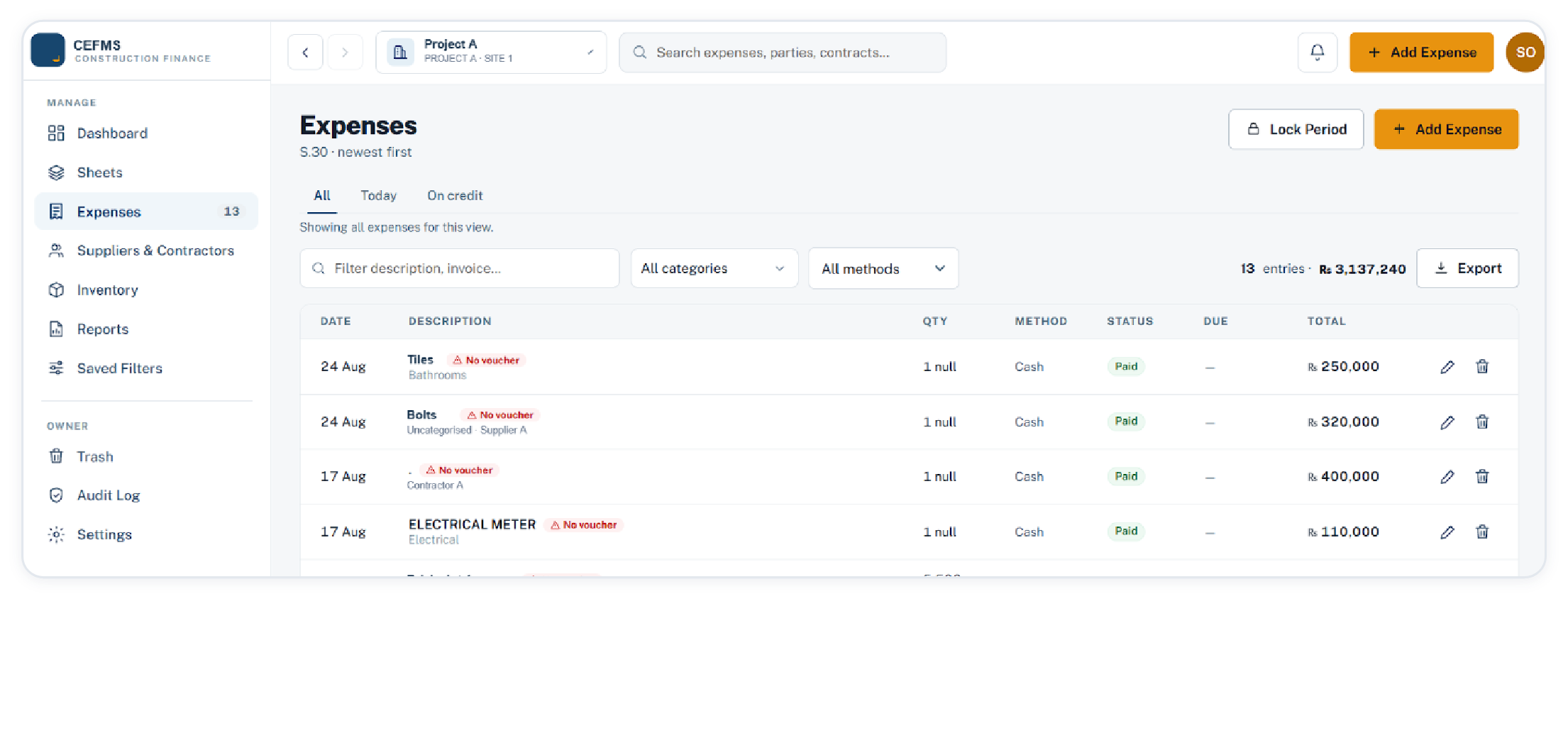
The list filters by description, invoice, category and payment method, shows entry count and value together, and flags rows with no voucher attached. Locking a period freezes the entries that exist up to that date for everyone except the owner.

Expenses list with filters, no-voucher flags and export
Expenses · all, today, on credit · vouchers attach as PDF, JPEG, PNG or WebP, 10 MB each
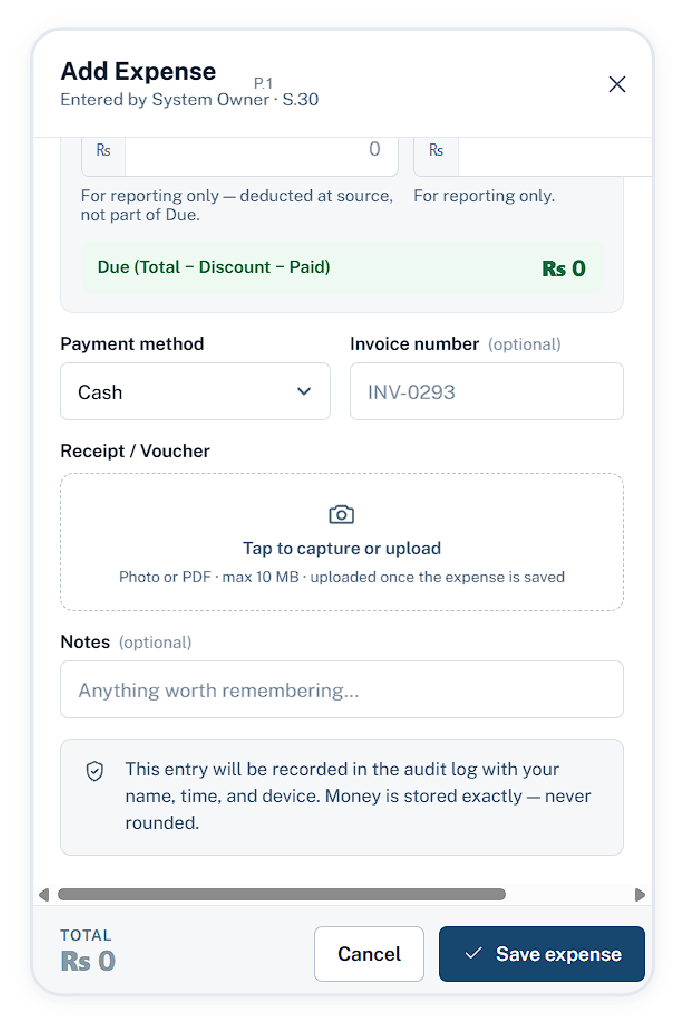
Add expense form
Quantity times unit price, or a lump sum

The total is computed and locked when a quantity and rate are given, and a lump-sum bill can be entered as a single figure. Discount and amount paid are separate fields, and the due amount is derived from total less discount less paid. Cash, bank, cheque and credit are the four methods. When the expense is created, what is owed and what was paid post to the party ledger as separate entries.

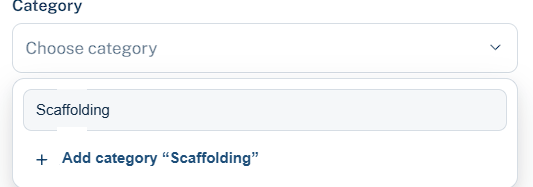
Creating a category from inside the form
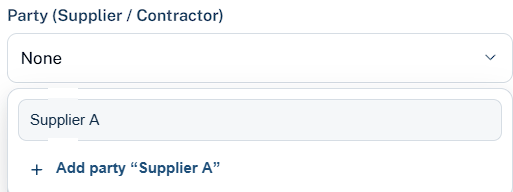
Creating a party from inside the form

A missing category head or a new supplier is created from inside the form, so an unfamiliar name is never a reason to leave the entry for later.

Genuine OptimumConstruction Expense & Finance Management System
Dashboard Expenses Sheets Parties
07

Four views of one ledger

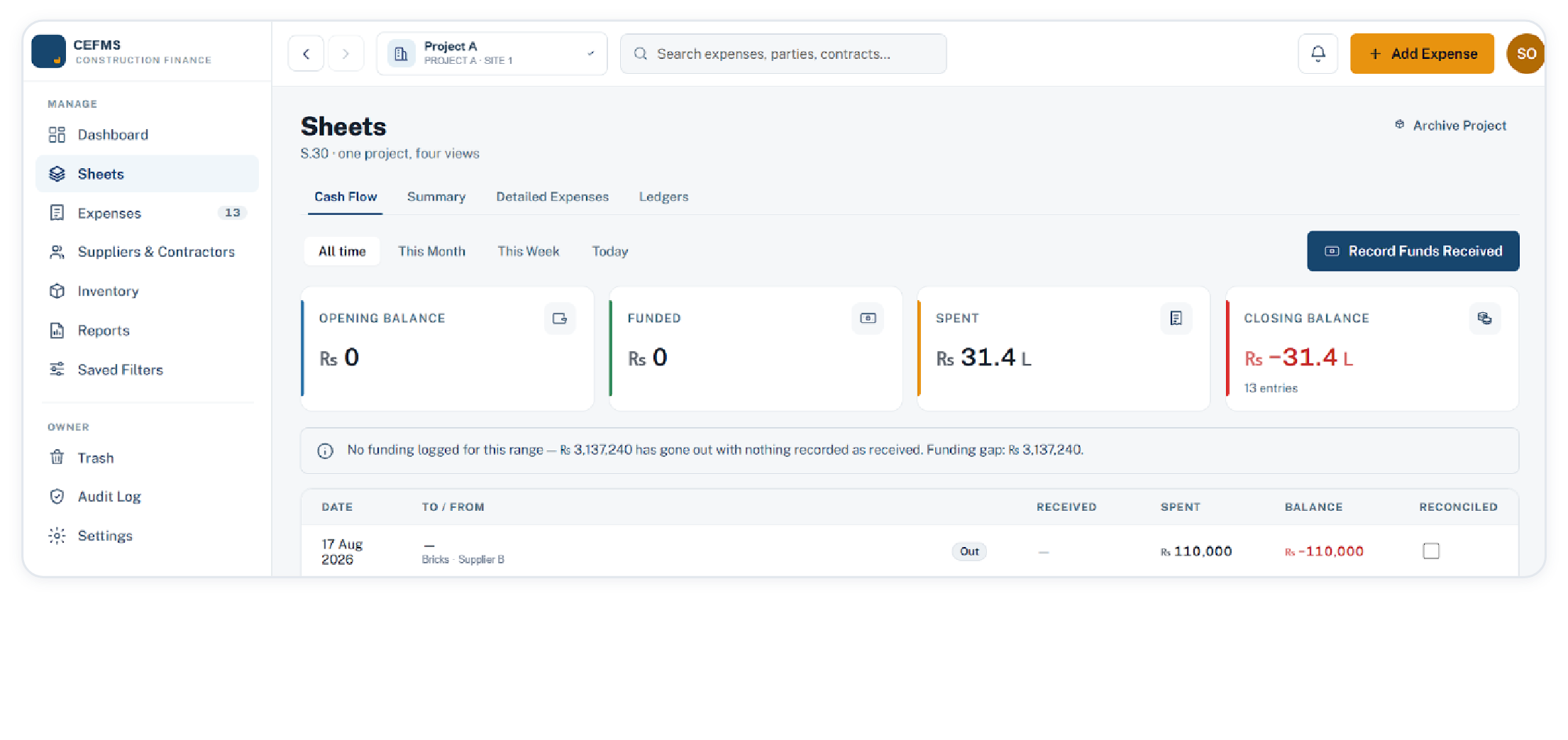
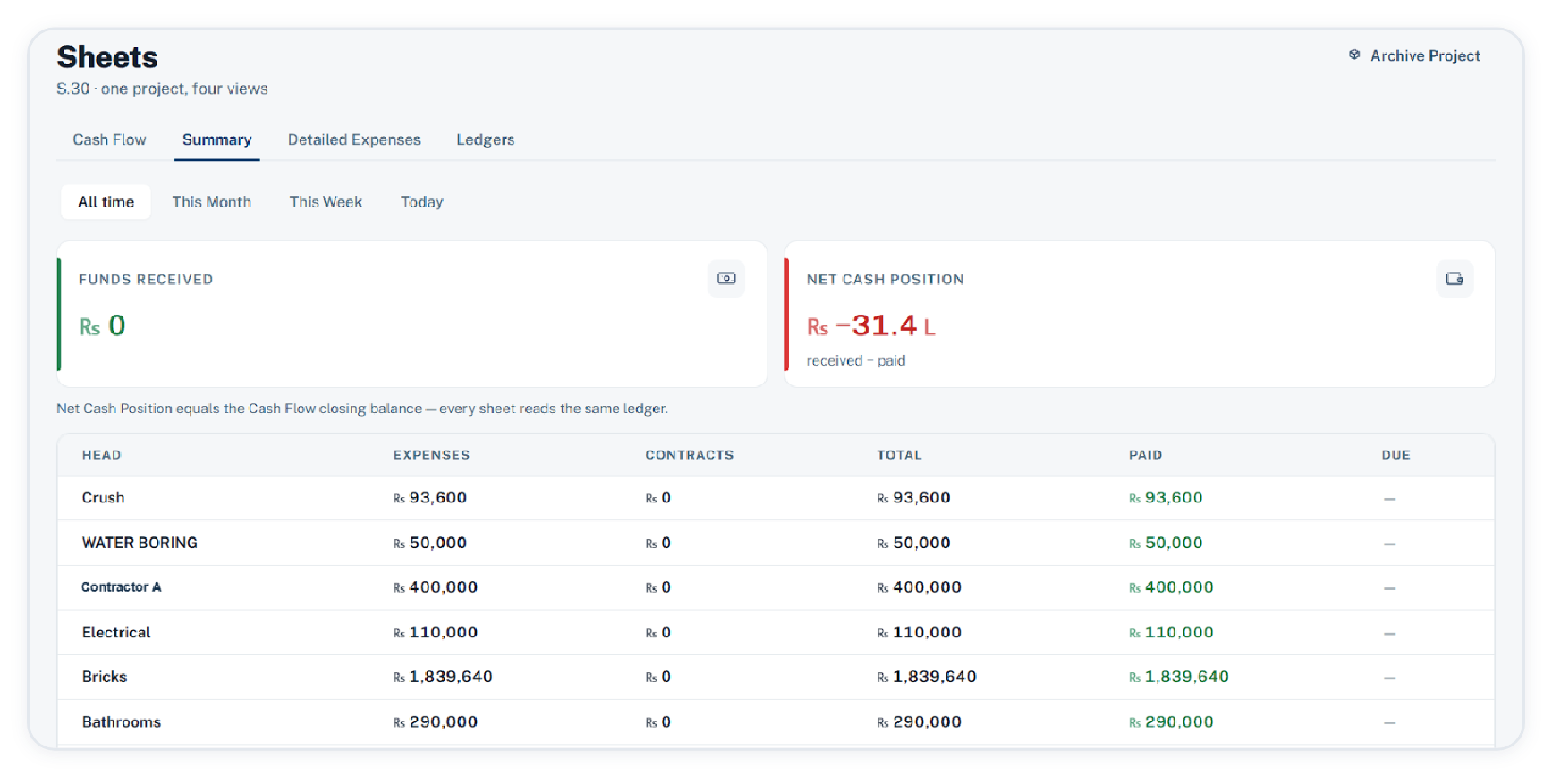
Cash flow, summary, detailed expenses and contract ledgers are tabs over the same records. Cash flow merges expenses, contract payments and funding into one running debit and credit ledger, with the opening balance entered on the report and a reconciled marker the owner or accountant can set.

Cash flow sheet with opening balance, funding, spend and running balance
Sheets · cash flow · the funding gap is stated in figures when nothing has been recorded as received
Summary sheet with head-wise expenses, contracts, paid and due
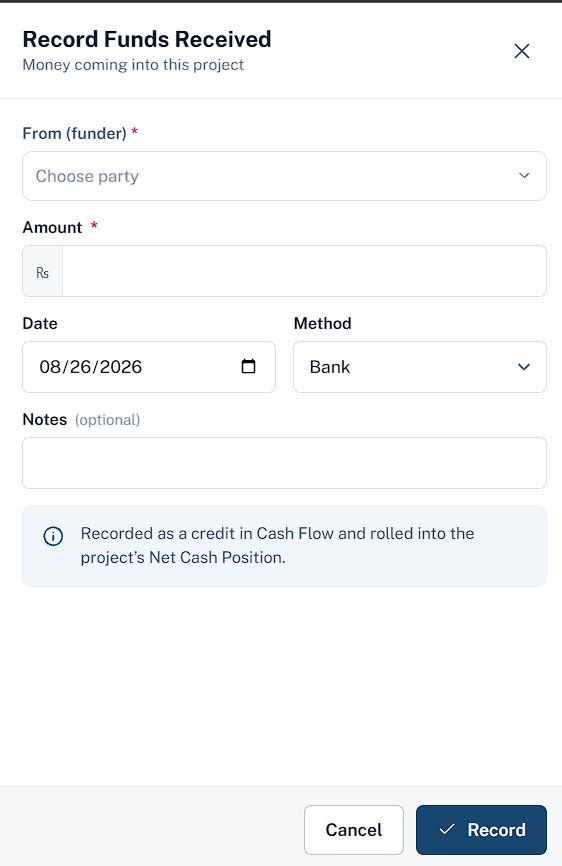
Record funds received
Summary · head-wise expenses, contracts, paid and due · money in is recorded against a party and credited to cash flow
Genuine OptimumConstruction Expense & Finance Management System
Dashboard Expenses Sheets Parties
08

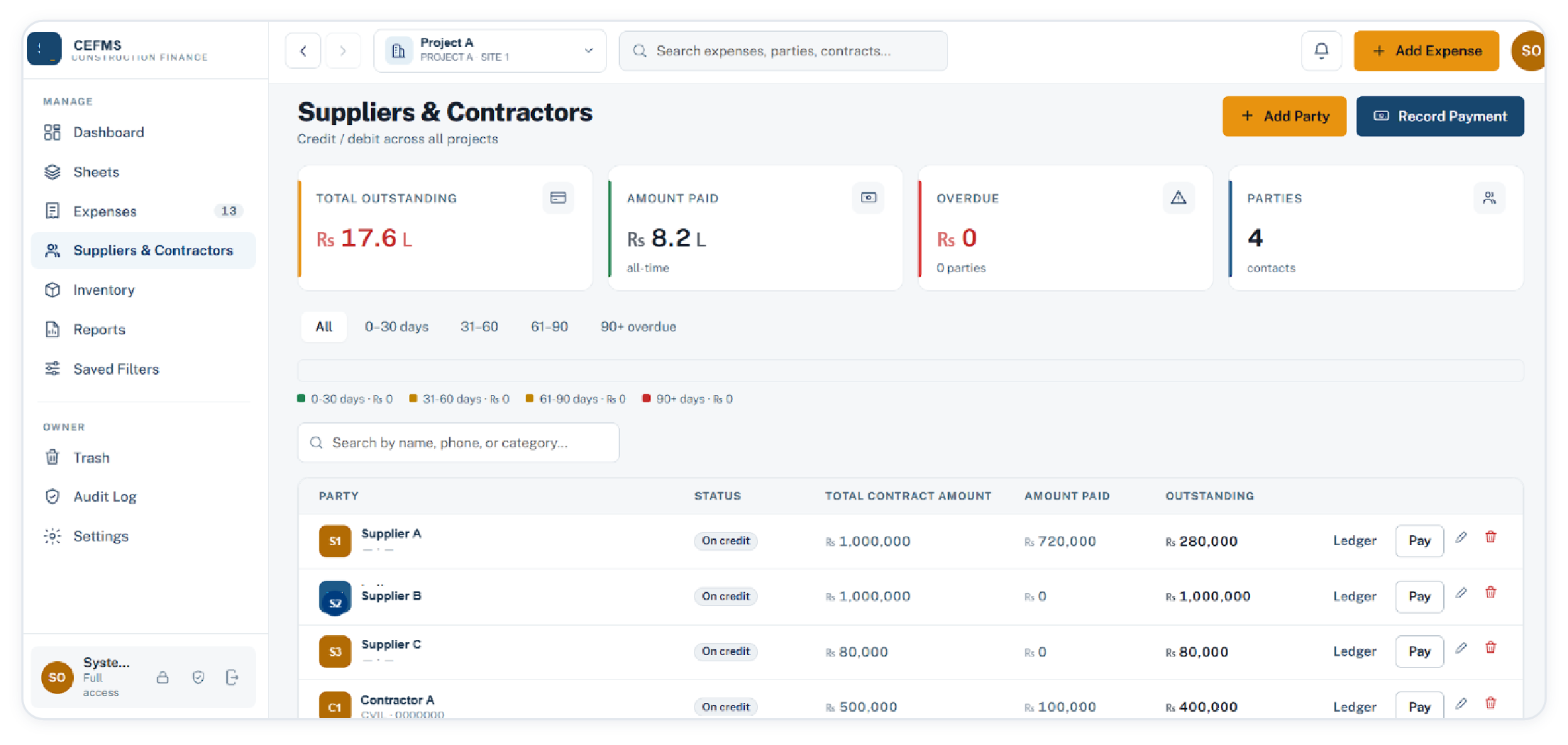
Suppliers and contractors, with the balance ageing

Credit and debit across all projects in one list: contract amount, paid, outstanding, and ageing by due date in 0 to 30, 31 to 60, 61 to 90 and 90 plus day buckets. Payment is recorded from the row itself.

Suppliers and contractors with outstanding, paid and ageing buckets
Suppliers & contractors · searchable by name, phone or category
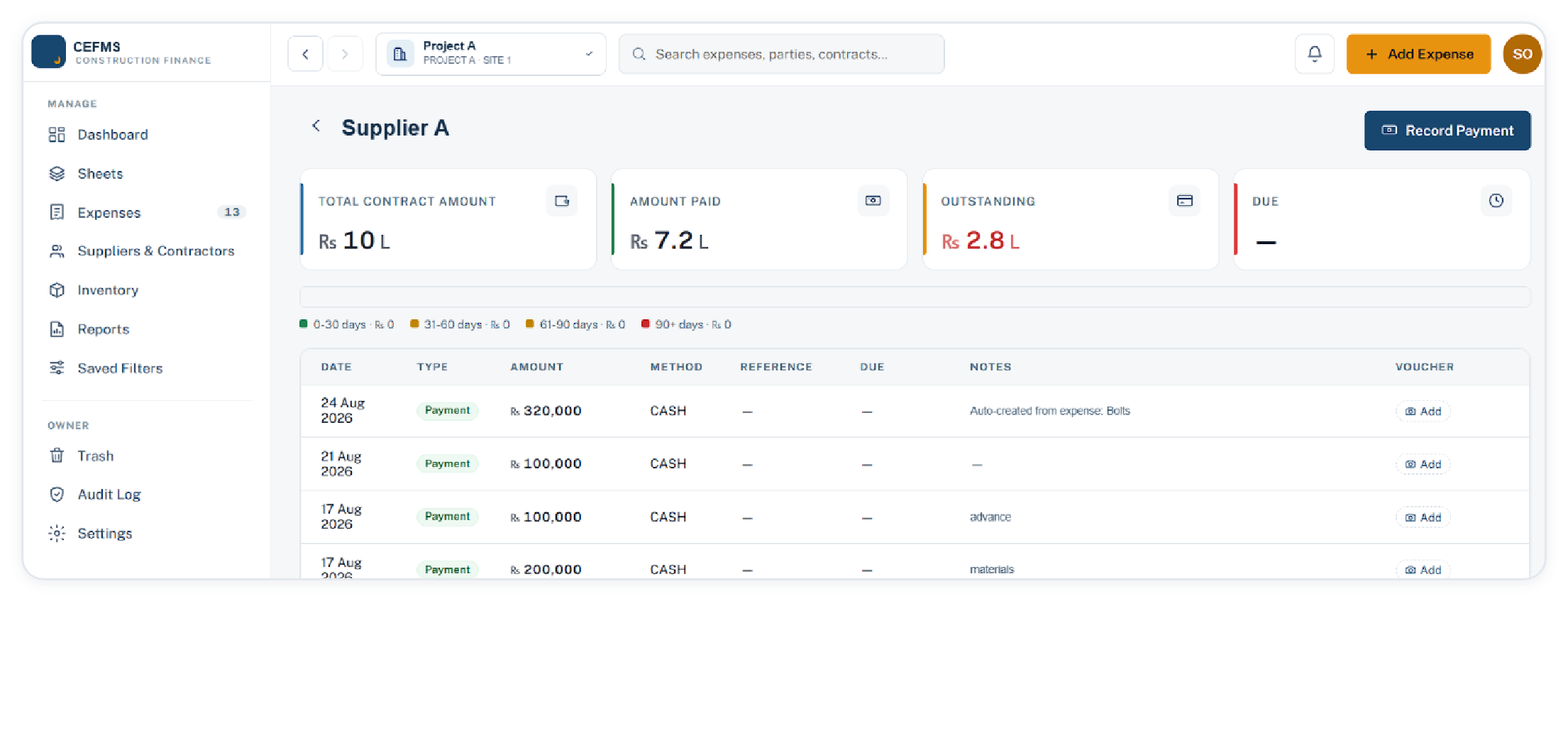
Party ledger with every payment, its method, note and voucher slot
Party ledger · payments post against the overall balance, not a single invoice · a voucher can be attached later
Genuine OptimumConstruction Expense & Finance Management System
Inventory Reports Projects Owner
09

Material stock, recorded as it moves

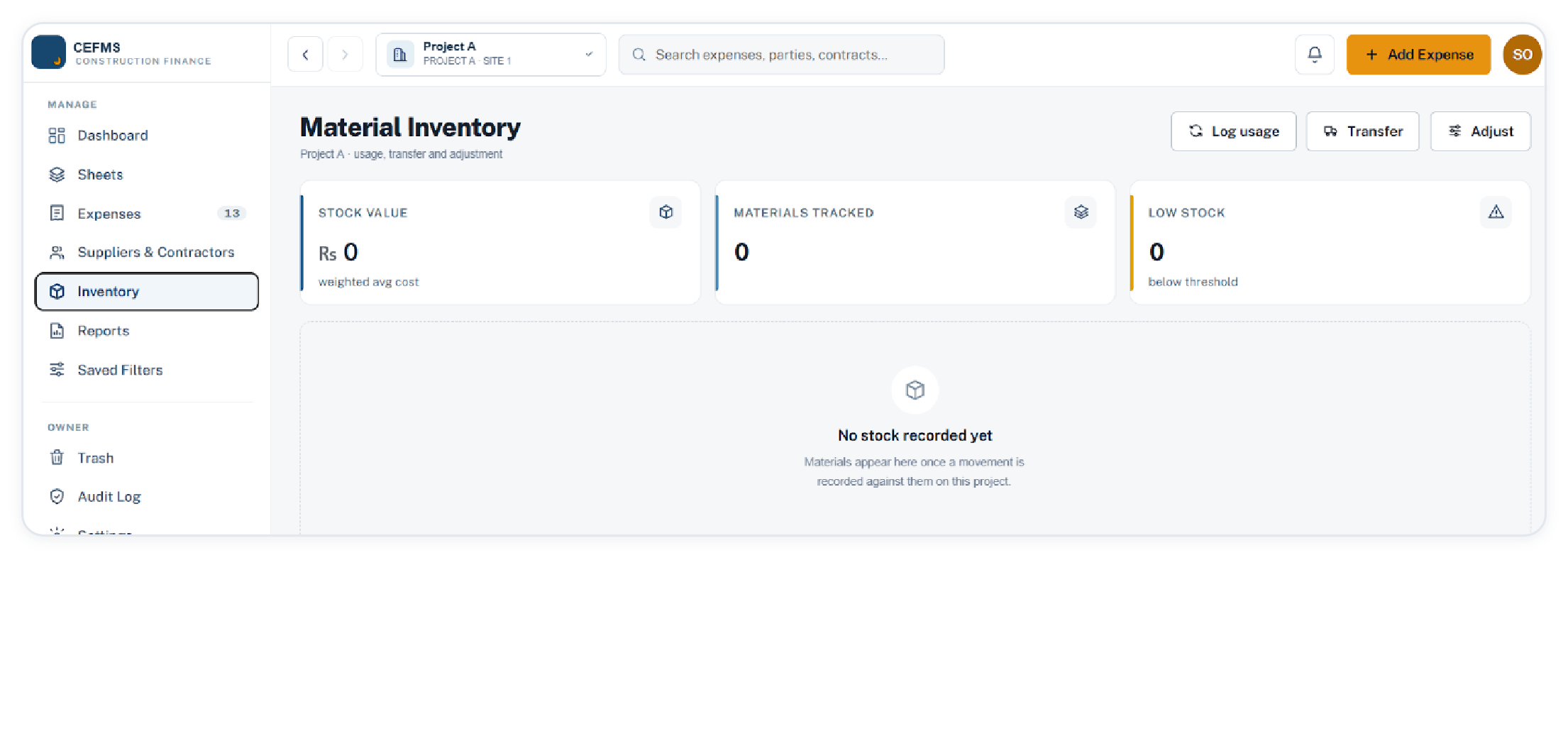
Stock is moved by hand: usage draws it down, transfers move it between projects, and adjustments correct or add it against a stated reason. Value is held at weighted average cost, recomputed by replaying the movement history rather than trusting a stored running total.

Material inventory with stock value, materials tracked and low stock
Inventory · usage, transfer, adjust · stock value at weighted average cost
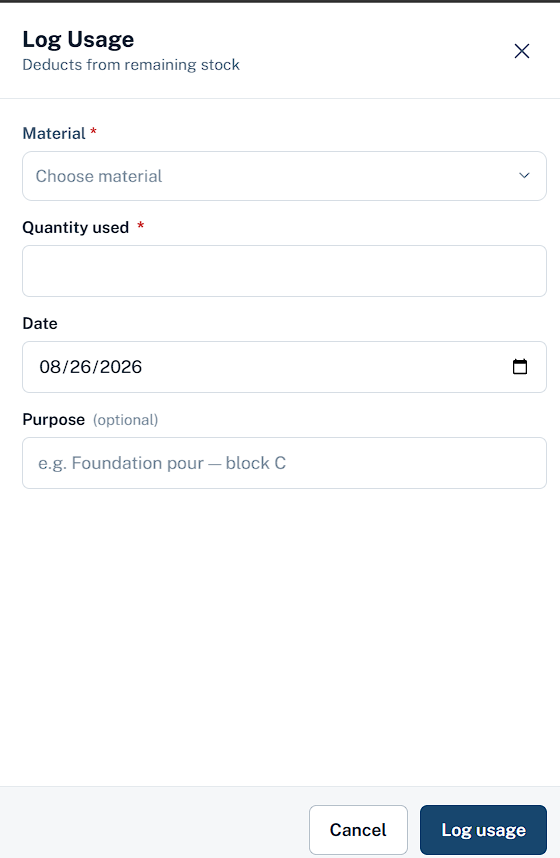
Log usage
Log usage

Deducts from remaining stock against a stated purpose. Quantity only: it moves no cost figure.

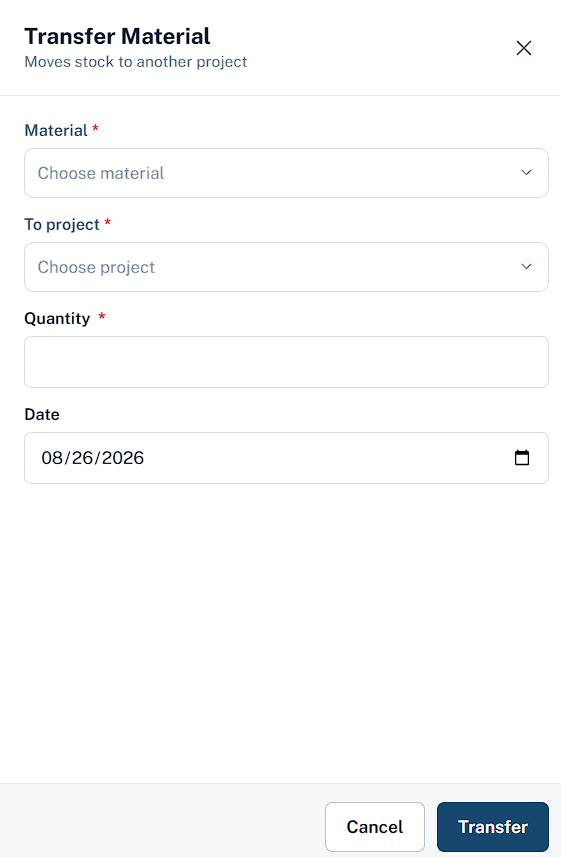
Transfer material
Transfer

Moves stock to another project, valued at the source project’s current average cost.

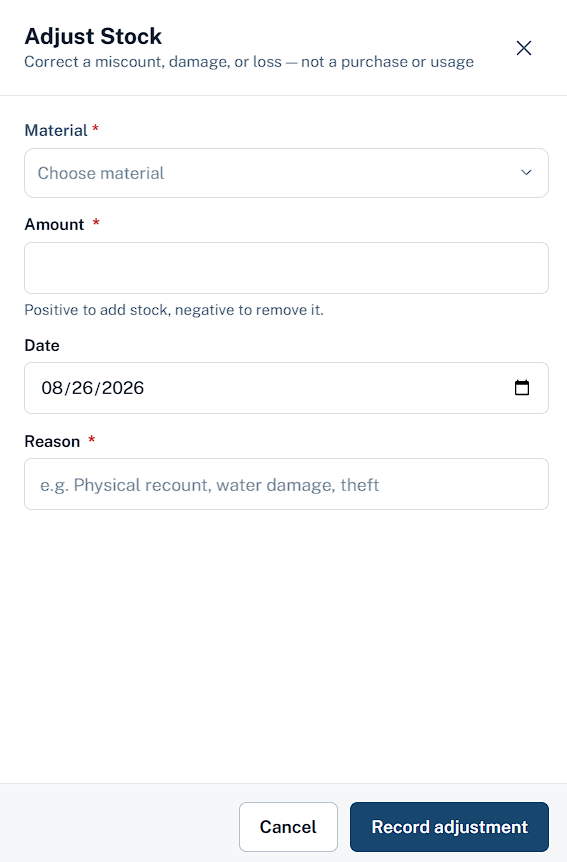
Adjust stock
Adjust

Corrects a miscount, damage or loss against a stated reason, and is today the only way to add stock from the interface.

Genuine OptimumConstruction Expense & Finance Management System
Inventory Reports Projects Owner
10

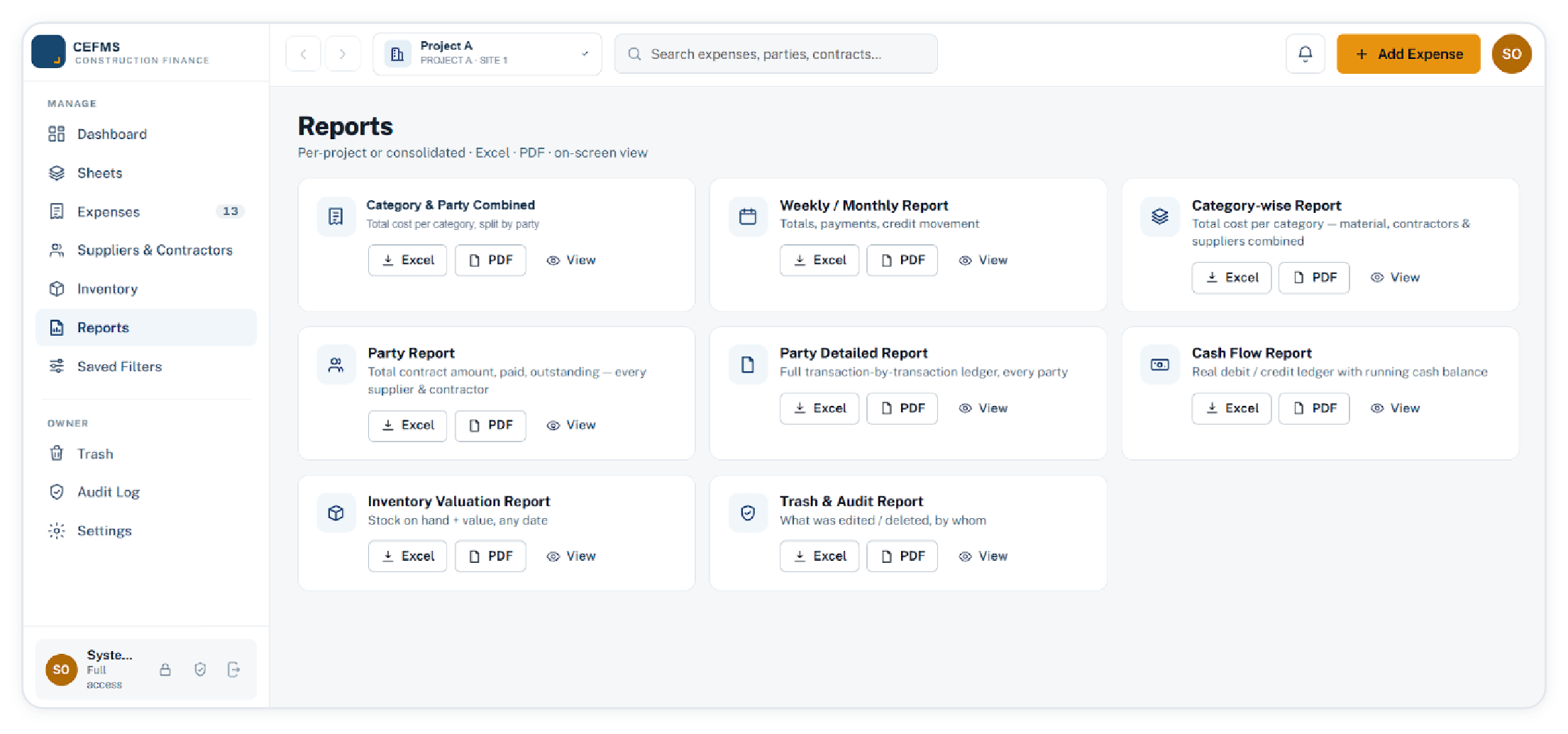
Eight reports, three ways out

Per project or consolidated, each available as Excel, CSV or PDF, plus an on-screen view. These are the documents an accountant, a financier or a partner asks for, so they are generated rather than assembled by hand.

Reports screen with eight report types, each exportable to Excel or PDF
Reports · per-project or consolidated · Excel, PDF, on-screen view
Also on this screen

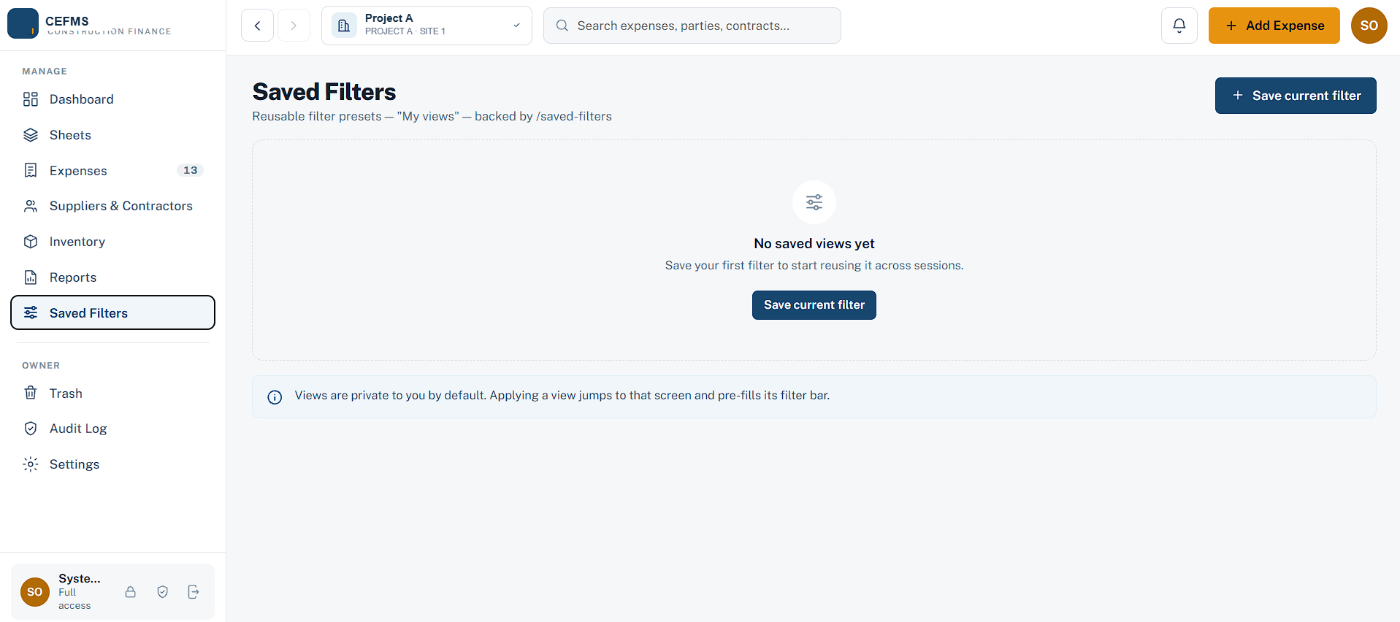
Saved filters turn a filter combination into a reusable view. Applying one jumps straight to that screen, and on Expenses it restores the saved filter values with it. Views are private to the user by default.

Saved filters
Genuine OptimumConstruction Expense & Finance Management System
Inventory Reports Projects Owner
11

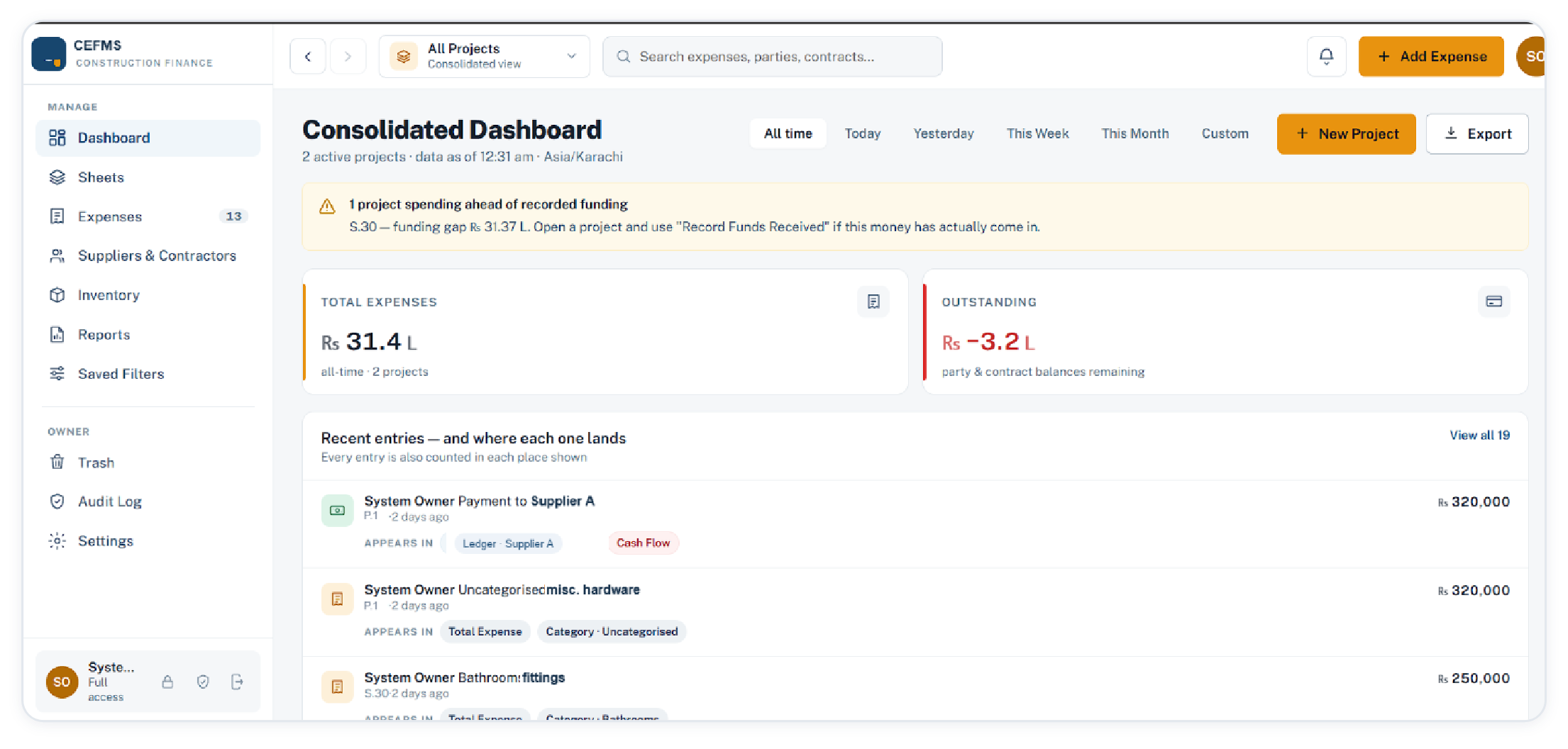
Several sites, one consolidated position

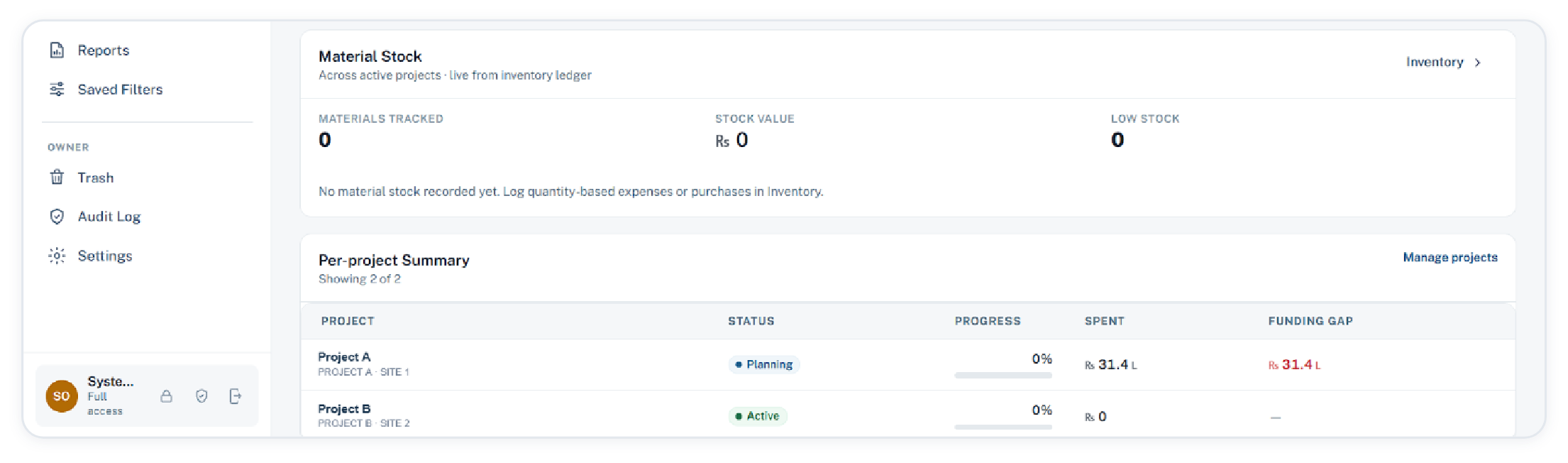
Switching to all projects consolidates the figures and raises the exception first: which project is spending ahead of recorded funding, and by how much. Each project keeps its own status, spend and funding gap.

Consolidated dashboard across projects with a funding warning
Consolidated dashboard · stamped with the time the figures were read
Per-project summary with status, progress, spend and funding gap
Per-project summary · status, progress, spent, funding gap
Genuine OptimumConstruction Expense & Finance Management System
Inventory Reports Projects Owner
12

Access is granted, revoked, and never deleted

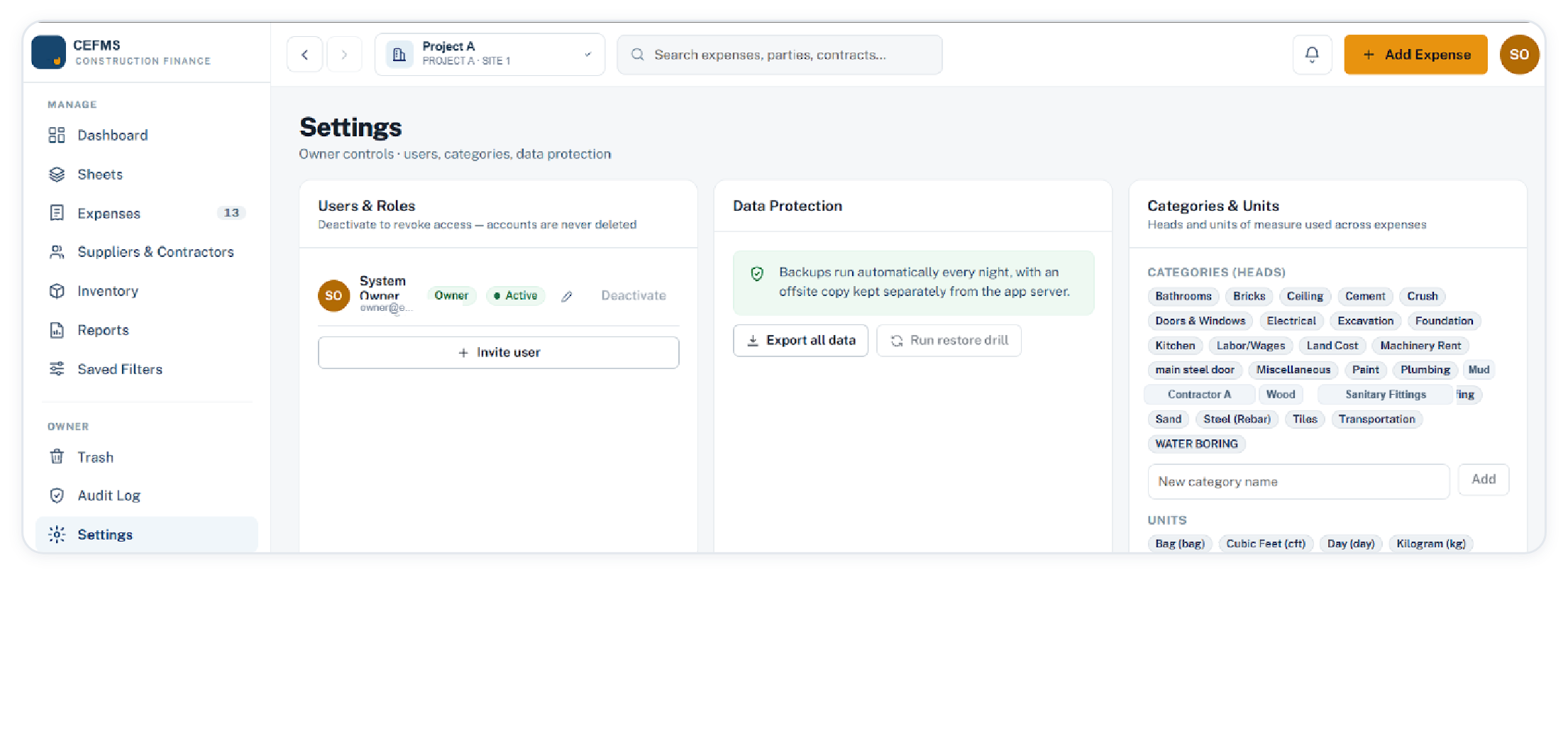
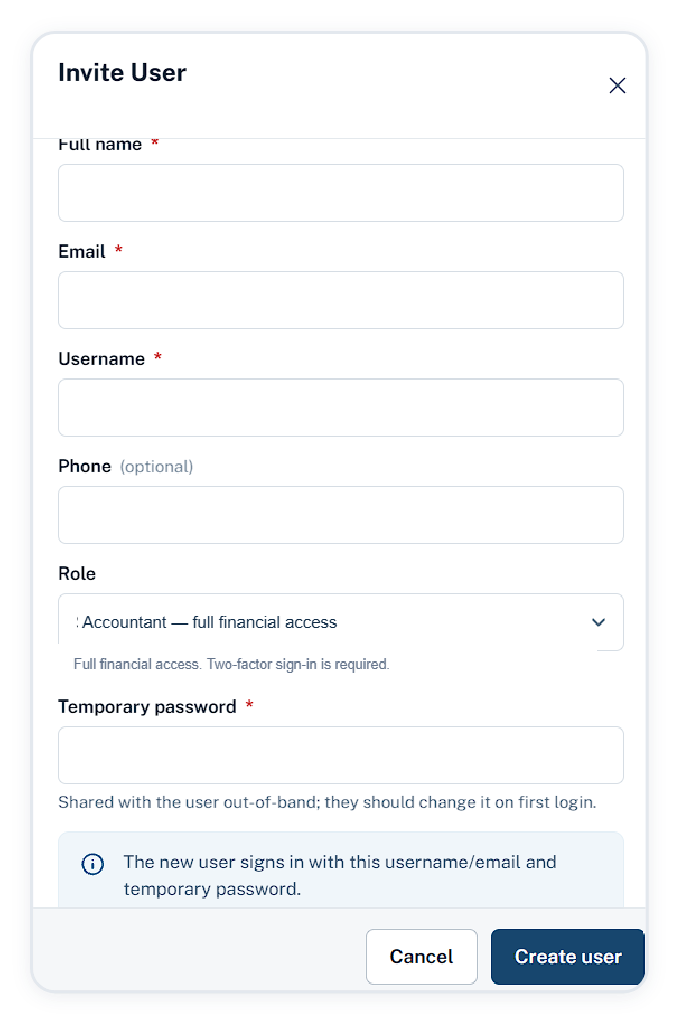
The owner invites users, assigns a role, and deactivates an account when someone leaves the site. Accounts are never deleted, because the entries they made must keep their author.

Settings with users and roles, data protection, categories and units
Settings · owner controls: users, data protection, categories and units
Invite user dialog with role selection and a temporary password
Owner, full access

Everything in the walkthrough, plus trash, audit log and settings, which are owner-only screens.

Accountant, full financial access

The same financial reach as the owner across every project, with two-factor sign-in required.

Viewer, read only

Read access, and the one role that can be limited to named projects. Invited with a temporary password.

Sign-in

Two-factor authentication is mandatory for owner and accountant. Passwords run to fifteen characters and are checked against known breaches.

Genuine OptimumConstruction Expense & Finance Management System
Inventory Reports Projects Owner
13

Nothing changes quietly, nothing is lost quietly

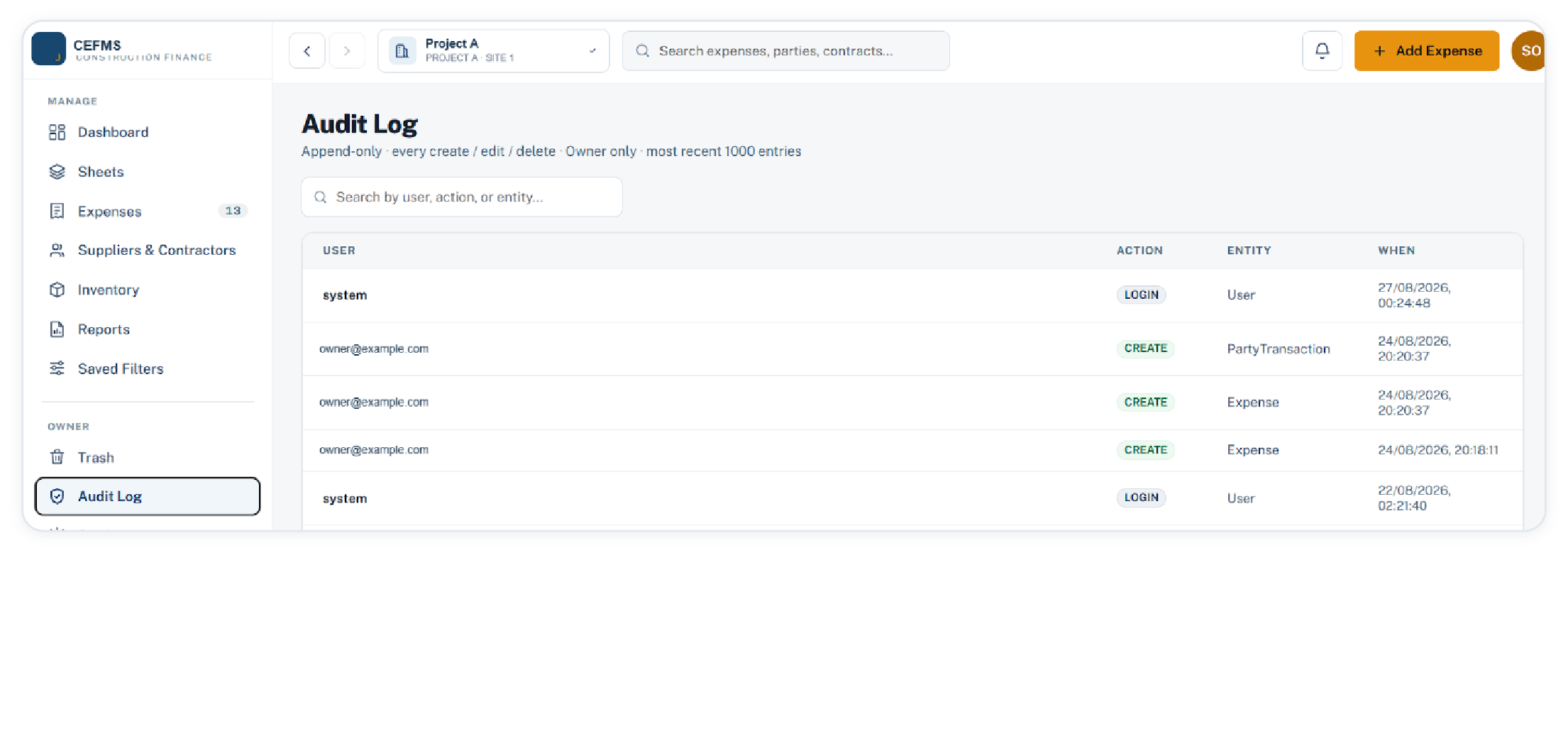
The audit log is append-only. Every create, edit, delete and login is stored with the user, the entity, the time, and the values before and after the change. The screen lists the actions; the values sit behind them in the record.

Append-only audit log of creates, edits, deletes and logins
Audit log · searchable by user, action or entity · the screen shows the most recent 1,000 of a log kept in full
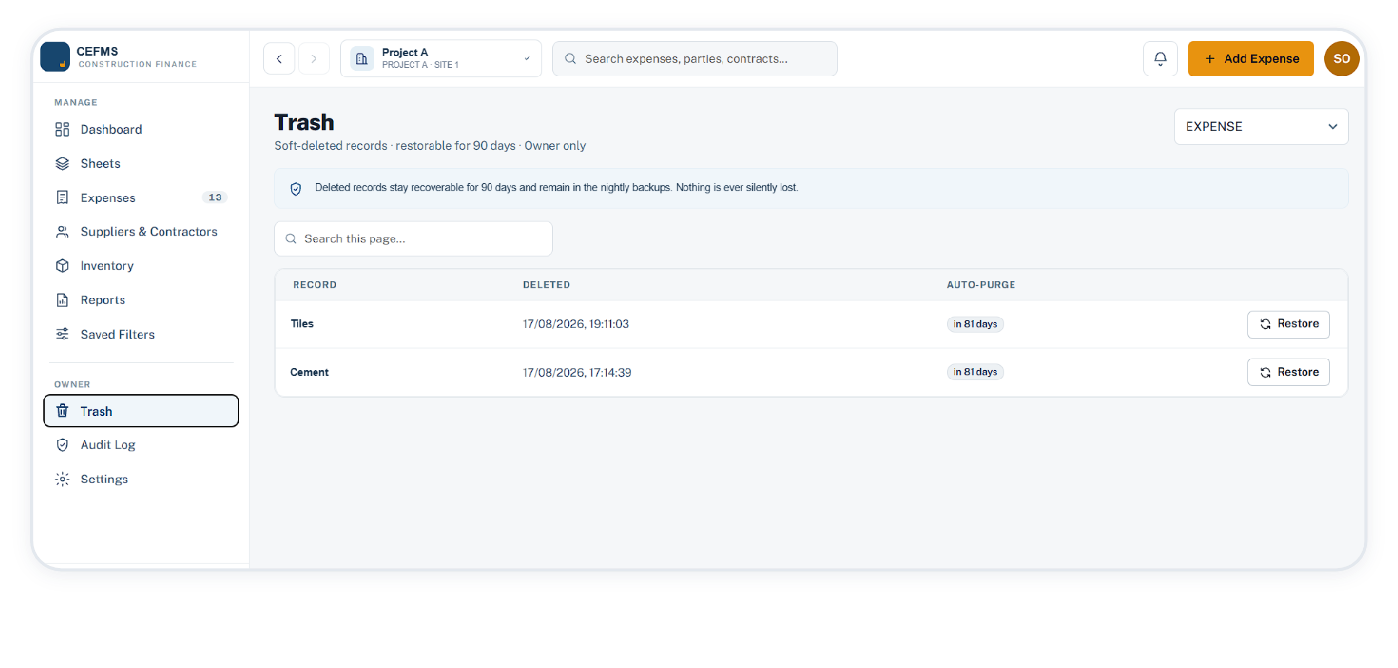
Trash with restorable records and an auto-purge countdown
Deletion is reversible

Deleted records are soft-deleted and restorable for 90 days, with the purge date shown on each row.

Backups

Backups run automatically every night, with an offsite copy kept separately from the app server. Deleted records remain in those backups. The owner can export the core business data as a zip of eleven tables with every receipt file. Restores are run by us, not from inside the app.

Money handling

Amounts are stored exactly, never rounded. Locking a period protects the entries that already exist in it from everyone but the owner.

Genuine OptimumConstruction Expense & Finance Management System
Feature matrix Direction
14

Feature matrix

Everything below is in the working product today, and appears in the screens on the previous pages.

Module What it does Output
Dashboard Total spent, funded, cash in hand, funding-gap warning, spend by material or contractor or paid against owed, expense trend, project progress, cost per sq ft calculator Screen, chart download
Expenses Entry with quantity and rate or a lump sum, discount, paid and due, payment method, invoice number, voucher upload, notes; filters by description, category and method; no-voucher flag; period lock Screen
Sheets Cash flow merging expenses, contract payments and funding with a running balance and reconciliation marker; head-wise summary; detailed expenses; contract ledgers; funding entries Screen, export
Suppliers & contractors Contract amount, paid and outstanding per party across projects; ageing buckets to 90 plus days; payment recording; per-party transaction ledger with voucher slots Screen, export
Inventory Usage, transfer and adjustment movements valued at weighted average cost; per-material low-stock threshold; adjustments require a reason Screen, valuation report
Reports Weekly or monthly, category-wise, party, party detailed, category and party combined, cash flow, inventory valuation, trash and audit, per project or consolidated Excel, CSV, PDF
Saved filters Reusable filter presets that jump to a screen with its filter bar pre-filled, private to the user by default Screen
Owner controls Users and roles with deactivation, editable category heads and units, nightly offsite backups, full data export, 90-day trash, append-only audit log kept in full Screen, export
Projects Multiple projects with five statuses, a consolidated read-only view that drops archived projects from its totals, per-project summary with funding gap, global search over expenses, parties and contracts Screen, export
Genuine OptimumConstruction Expense & Finance Management System
Feature matrix Direction
15

Where the product goes next

The product grows from the sites using it. Everything below is under evaluation rather than promised on a date, and nothing that ships is allowed to weaken the guarantees on the previous pages.

Evaluating
Faster capture at the gate

Reading a voucher photo to pre-fill the amount, party and quantity, so the site user confirms an entry instead of typing it. The entry would stay reviewable and editable before saving.

Evaluating
Questions answered from your own ledger

Asking for a figure in plain language, such as what bricks cost this month or which party is furthest overdue, and getting the number with the entries behind it.

Evaluating
Quiet checks on the data

Flagging a rate far from the recent average, or a duplicate voucher, as a prompt to look. Never an automatic correction.

Evaluating
Integrations, on request

Handover of the ledger to the accounting package a firm already uses, and richer exports for financiers.

Our position on this

A firm’s cost data is commercially sensitive. Assistance of this kind would be opt-in per project, visible in the audit log like any other action, and would not put your figures into anyone else’s hands. Where a feature cannot meet that bar, it does not ship.

Genuine OptimumConstruction Expense & Finance Management System
Genuine Optimum

Built for firms whose accounts still live in a register

Every screen in this document is from the working product, pre-launch and in daily use on one live project. Each firm that adopts it shapes what is built next.

Construction Expense & Finance Management SystemProduct portfolio · 2026